RAW vs JPEG Metadata: Privacy Guide for Photographers
Your camera captures more than meets the eye. Every time you press the shutter, your images are embedded with hidden data. This data, known as metadata, could reveal your location, your expensive equipment, or even sensitive client details. As a photographer, understanding and managing this information is crucial for protecting your work, your clients, and your privacy.
Are you unknowingly sharing sensitive data with every photo? This guide is for photographers who shoot in RAW or JPEG and want to secure their workflow. We will explore the metadata differences between these formats, the professional risks involved, and how to remove this data effectively. With the right tools and knowledge, you can share your images with confidence. For a quick and secure solution, you can always try our free tool.

This article will break down everything you need to know. You'll learn what data exists in your RAW and JPEG files and the unique privacy risks each format presents. Most importantly, you will discover how to create a secure workflow that ensures your images are clean before you send them to clients or post them online.
Understanding RAW vs JPEG Metadata Fundamentals
To protect your images, you first need to understand what data they contain. Both RAW and JPEG files store metadata, but they do so differently. This section breaks down the fundamentals for photographers who need to master their digital workflow and protect their assets.
What Metadata Actually Exists in RAW Files?
RAW files are like digital negatives. They contain the unprocessed sensor data from your camera. Because they're uncompressed, they store vast amounts of information. This includes not just image data, but also extensive metadata written directly by the camera.
Common metadata found in RAW files includes:
- Camera Settings: Shutter speed, aperture, ISO, white balance, and lens information.
- Device Information: Camera make, model, and unique serial number.
- Timestamps: The exact date and time the photo was taken.
- GPS Data: If your camera has GPS enabled, it will record the precise geographic coordinates of where the photo was shot.
- Photographer Notes: Some cameras allow you to add copyright information or comments directly to the file.
This data is invaluable for your editing process but can become a liability if shared publicly.
JPEG Metadata Simplified: What Changes During Compression?
When you shoot in JPEG or convert a RAW file to JPEG, the image is processed and compressed. This process makes the file smaller and easier to share, but it also changes how metadata is handled. While some metadata might be stripped during conversion by certain software, most of it is carried over.
The JPEG file you share often contains the same sensitive information as the original RAW file, including camera details, settings, and location tags. The compression primarily affects the image data itself, not the text-based metadata attached to it. This means a shared JPEG can still leak your location or expose the expensive gear you used on a shoot. It's a common misconception that JPEGs are "cleaner" by default.
The Critical Differences: EXIF, IPTC, and XMP in Both Formats
Metadata isn't just one block of information; it's organized into different standards. Understanding these is key to managing it.
- EXIF (Exchangeable Image File Format): This is the most common standard, automatically generated by your camera. It contains all the technical details: camera model, serial number, aperture, ISO, shutter speed, and GPS coordinates. Both RAW and JPEG files contain rich EXIF data.
- IPTC (International Press Telecommunications Council): This standard is for descriptive information, often added by the photographer during or after the shoot. It includes captions, keywords, creator name, copyright details, and location information (city, state, country). It’s crucial for stock photography and journalism.
- XMP (Extensible Metadata Platform): Developed by Adobe, XMP is a more modern and flexible standard. It can store EXIF and IPTC data, as well as editing history from software like Lightroom or Photoshop (e.g., adjustments to exposure or color).
In a professional workflow, your RAW file starts with EXIF data. As you edit, you might add IPTC and XMP data. When you export to JPEG, all three types of metadata are often bundled together. This creates a detailed digital footprint.
Professional Metadata Risks: Why Photographers Should Care
For professional photographers, metadata is more than just a technical detail—it's a matter of security, privacy, and client trust. Leaving metadata in your images can introduce significant risks that affect your business and reputation. Protecting your images before delivery is a non-negotiable step in a modern workflow.
Equipment Security: How Your Camera Details Can Be Compromised
Every photo you take reveals your camera and lens details, including make, model, and sometimes the serial number. When you post these images online—on your portfolio, social media, or a blog—you're broadcasting your gear list to the world.
This can attract unwanted attention. Thieves can use this information to target you, knowing you own expensive equipment. If you post photos from a home studio or a specific location repeatedly, you are inadvertently telling criminals what gear you have and where to find it. Removing this metadata is a simple but powerful step to protect your physical assets. You can easily strip this data before publishing any image.
Location Privacy Risks When Shooting On-Location
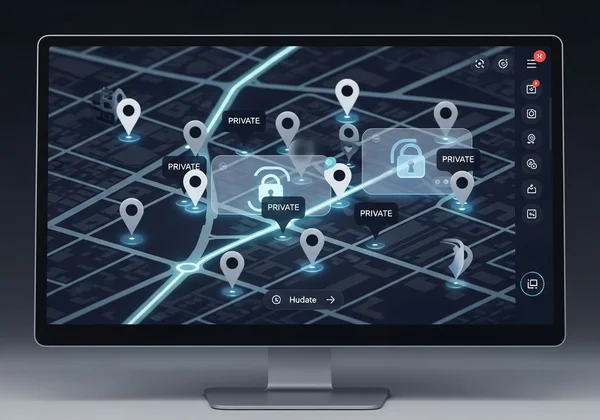
Geotagging is a useful feature for organizing your photos, but it’s a major privacy liability when sharing them. If your camera’s GPS is on, every image will have precise latitude and longitude coordinates embedded in its EXIF data.
For photographers shooting on location, this poses several risks:
- Revealing Private Locations: If you shoot at a private residence for a family portrait session, that address becomes public.
- Exposing "Secret" Spots: Landscape and nature photographers often have unique, secluded spots they don't want to share. Geotags can lead crowds right to them.
- Personal Safety: Posting a photo from a location while you are still there can compromise your personal safety.
Stripping GPS data before sharing is essential for protecting your favorite spots, your clients' privacy, and your own security.
Client Privacy Concerns: Protecting Subjects in Commercial Work
As a professional, your duty of care extends to your clients. The photos you take for them can contain sensitive information. For example, a corporate headshot could reveal the location of a private office, or a family portrait could tag the family's home address.
In an age of data privacy regulations like GDPR, failing to remove this information can have legal and financial consequences. Clients trust you to handle their images responsibly. Delivering files that contain unnecessary and potentially revealing metadata is unprofessional and breaks that trust. A secure workflow must include a final step to clean all images of personally identifiable information before client delivery.
Technical Solutions: Removing Metadata in Professional Workflows
Knowing the risks is half the battle. The other half is implementing a reliable process to remove metadata. Fortunately, creating a secure workflow doesn't have to be complicated. With the right practices and tools, you can ensure every image you deliver or publish is clean.
Best Practices for RAW File Metadata Removal
RAW files are your digital negatives and should be protected. While you need the metadata for your own editing and archival purposes, it should be stripped before any version of the image is shared.
Most professional editing software, like Adobe Lightroom or Capture One, offers options to control which metadata is included upon export. When exporting JPEGs for clients or web use, you can create a preset that specifically excludes personal or location data. However, manually managing these settings for every export can be prone to error. A dedicated tool offers a final, foolproof check.
JPEG Metadata Cleaning Without Image Quality Loss
A major concern for photographers is whether removing metadata will degrade image quality. This is a valid question, as you've spent hours editing your images to perfection.
The good news is that metadata removal does not affect image quality. The metadata is stored separately from the visual image data. A proper metadata remover simply erases this text-based segment without re-compressing or altering the pixels. Using a trusted online tool like MetadataRemover.org ensures that your image quality remains completely untouched while all hidden data is wiped clean.
Creating a Secure Client Delivery Workflow
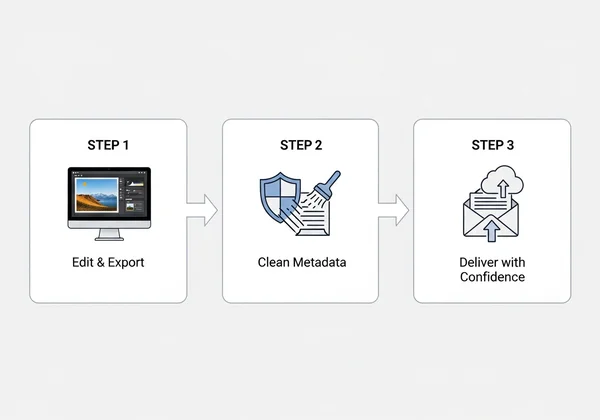
A secure workflow is simple, repeatable, and effective. Here is a three-step process to ensure your client deliverables are always safe:
- Edit and Export as Usual: Complete your editing process in your preferred software. Export the final JPEGs to a dedicated "For Delivery" folder.
- Clean the Metadata: Before uploading to a client gallery or attaching to an email, process the entire folder through a reliable metadata removal tool. This is your final quality assurance check for privacy. Services like MetadataRemover.org make this step quick and easy by allowing you to simply drag and drop your files.
- Deliver with Confidence: Now that your images are clean, you can deliver them to your client. You can rest assured that you have protected their privacy, your equipment details, and your location information.
This simple addition to your workflow takes only a few moments but provides immense value in professionalism and security.
Implementing Your Professional Metadata Strategy
As a photographer, your focus is on creating beautiful images. But in today's digital world, your responsibility extends to the data hidden within them. First, understand how RAW and JPEG metadata differ. Then, recognize the potential risks to your equipment, locations, and clients. Finally, take decisive action to protect your work and your clients' privacy.
By integrating a simple, reliable metadata removal process into your workflow, you elevate your professionalism and build trust. You are no longer just delivering photos; you are delivering peace of mind.
Don't leave your privacy and your clients' data to chance. Make metadata management a standard part of your craft. Start today by creating a secure workflow that protects every image you share.
Ready to clean your images and protect your professional work? Visit MetadataRemover.org to use our fast, free, and secure tool.
FAQ Section
What metadata is most dangerous to leave in RAW files?
The most dangerous metadata is typically GPS coordinates (geotags) and camera serial numbers. Geotags can reveal sensitive locations like your home, a client's address, or a private photo spot. Serial numbers can be used to track your equipment, making you a target for theft.
Can MetadataRemover.org handle professional RAW files?
While many professional workflows involve exporting to formats like JPEG or PNG before delivery, our tool is optimized for these common shareable formats. It supports JPEG, PNG, TIFF, and GIF. For the best practice, edit your RAW files, export them to JPEG, and then use our online tool to clean the final files before sharing or delivery.
How do I maintain image quality when removing metadata?
Metadata removal does not affect image quality. The metadata is stored separately from the visual image data. A proper tool, like ours, erases the metadata section of the file without re-compressing or altering the pixels. Your image will look exactly the same, just without the hidden data.
Is it safe to remove metadata before client delivery?
Yes, it is not only safe but highly recommended. Removing metadata protects your client's privacy by stripping location data and other identifiers. It also demonstrates your professionalism and commitment to data security, which builds trust and enhances your reputation.
What metadata should I preserve for my own records?
For your personal archive (your RAW files), it's useful to keep all the original EXIF data. This includes camera settings (ISO, aperture, shutter speed), date, and time. This information is invaluable for referencing your technique and organizing your library. The key is to strip this data only from the copies you share or deliver.