Complete Guide to EXIF, IPTC & XMP Metadata: Understanding and Removal
Every time you snap a photo with your smartphone or a professional DSLR, you are creating more than just a visual image. You are also generating a digital file packed with hidden information. This hidden data, known as metadata, acts like a digital diary for your picture. While it is incredibly useful for organizing files and professional editing, it can also be a significant privacy risk. Do you know exactly what your photos are saying about you?
Embedded details can reveal your precise location, the equipment you use, and even the exact second a photo was taken. For many users, this is an invisible threat to their personal security. This guide will walk you through the three main types of image data—EXIF, IPTC, and XMP—and show you why managing this information is essential for your digital safety. Ready to protect your privacy? Try our free metadata remover before sharing your next post.
Understanding these technical standards is the first step toward taking control of your digital footprint. Whether you are a casual social media user, a professional photographer, or a business owner concerned about compliance, this guide provides the clarity you need.
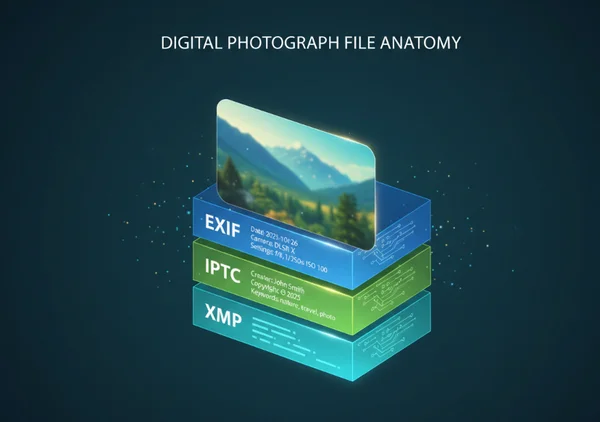
Understanding the Three Pillars of Image Metadata
To manage your digital privacy effectively, you must first understand the three main standards used to store information within image files. These "three pillars" serve different purposes, ranging from recording technical camera settings to protecting intellectual property.
EXIF Data: Understanding Your Camera's Digital Footprint
EXIF stands for Exchangeable Image File Format. This is the most common type of metadata and is created automatically by your device the moment you press the shutter button. Think of EXIF data as a technical logbook that records exactly how a photo was made.
Common EXIF tags include:
- Camera make and model (e.g., iPhone 15, Canon EOS R5)
- Lens settings (aperture, shutter speed, ISO)
- Flash settings and white balance
- Date and time of the capture
- GPS coordinates (latitude and longitude)
While this information is a goldmine for photographers who want to study their technique, it also creates a "digital footprint." If you share an original image file, anyone with a basic viewer can see exactly where you were and what device you used. To prevent this, many people choose to clean images before uploading them to public forums.
IPTC Information: Professional Metadata for Storytelling
The IPTC (International Press Telecommunications Council) standard was developed to help journalists and photographers manage media content. Unlike EXIF data—which is mostly technical and automatic—IPTC data is typically added manually after the photo is taken. It focuses on the "who, what, and where" of the image.
IPTC tags often include:
- The photographer’s name and contact information
- Copyright notices and usage terms
- Captions, headlines, and descriptions
- Keywords for database searching
For professional creators, this data is vital for ensuring they get credit for their work. However, when these images are moved into a personal or private context, keeping this information attached might reveal professional associations or contact details you would rather keep private.
XMP Metadata: The Modern Extensible Framework
XMP (Extensible Metadata Platform) is a more recent standard created by Adobe. It was designed to be a flexible and "modern" way to handle metadata. Unlike older binary formats, XMP is based on XML, which makes it easier for different software programs to read and write the data.
The primary benefit of XMP is its ability to "wrap" both EXIF and IPTC data into a single, organized package. It also allows for more advanced tracking, such as recording every edit made to a photo in programs like Lightroom or Photoshop. Because XMP can store almost any type of information, it is often the most complex layer of image data to manage. If you are worried about the history of your photo edits being visible, you should strip exif data and XMP files using a dedicated tool.
Privacy Risks: What Your Images Might Be Revealing
While metadata is a powerful tool for organization, its "hidden" nature makes it a significant privacy concern. Most users are unaware that their photos are broadcasting sensitive details to the world.
Location Data: The Hidden GPS Coordinates
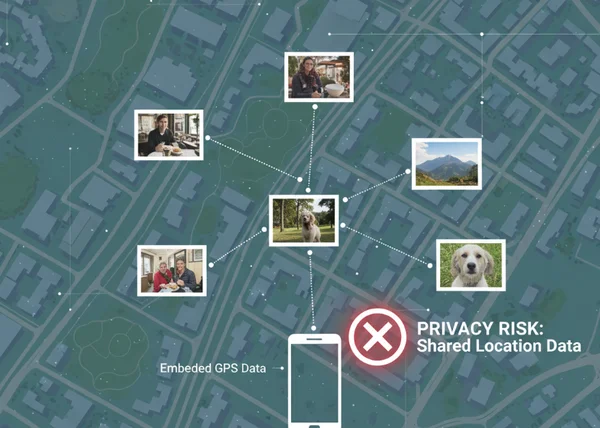
The most dangerous piece of EXIF information is the GPS tag. Many modern smartphones automatically embed the exact latitude and longitude of where a photo was taken. This is often accurate within a few meters.
When you post photos taken inside your home, your child's school, or your workplace, you may be unintentionally revealing private addresses to strangers. This information can be exploited by malicious individuals. Stalkers, burglars, and data harvesters can use this information to track your daily routines. To stay safe, it is highly recommended to erase exif data containing location tags before sharing any personal photos online.
Device Information: Your Camera Model and Settings Revealed
While it might seem harmless, revealing your camera model and serial number can have consequences. For professionals, this reveals their "secret sauce"—the specific settings and high-end gear they use to achieve a certain look. For general users, it informs marketers about the value of the devices they own. In some cases, serial numbers found in file headers have even been used to track stolen cameras across the internet, showing just how persistent this data can be.
Personal Identifiers: Timestamps, Serial Numbers, and More
This data often contains "temporal" information—the exact date and time a photo was taken. By analyzing a series of photos, someone could determine when you are usually away from home or when you are on vacation. Furthermore, some software embeds the name of the computer user who last edited the file. These small fragments of information, when combined, can build a surprisingly detailed profile of your identity and habits. Protecting yourself requires a proactive approach to remove image metadata whenever you share files outside of a trusted circle.
Practical Applications: When and Why You Need Metadata Removal
Knowing about these hidden details is only half the battle; knowing when to remove them is where the real protection begins. Different scenarios require different levels of data hygiene.
Social Media Sharing: Protecting Your Privacy Online
Most major social media platforms, like Instagram and Facebook, claim to strip metadata automatically when you upload. However, this is not always consistent, and it does nothing to protect you if you send photos via email, messaging apps, or shared cloud folders. To ensure your safety, you should never rely on the platform to do the work for you. Using an online metadata remover before you upload ensures that you are in control of your privacy from the start.
Professional Photography: Delivering Clean Images to Clients
Professional photographers often face a dilemma. They need metadata for their internal workflow, but they may want to deliver "clean" files to clients. Providing files without technical EXIF data prevents clients from scrutinizing the settings used or seeing the original timestamps of a shoot. It also presents a more professional, "pure" final product. Many pros use a free tool to quickly batch-clean images before the final delivery to ensure only the necessary copyright information remains.
Business Compliance: Meeting GDPR and Privacy Regulations
For businesses, metadata management is not just about privacy—it's about legal compliance. Under regulations like the GDPR in Europe, GPS coordinates and personal identifiers in photos can be classified as personal data. If a company accidentally publishes photos containing employee or customer metadata, they could face significant fines. Establishing a standard procedure to clear metadata from all corporate assets is a critical step in any modern data protection strategy.
Taking Control of Your Image Data
Image information is an essential part of modern photography, but it shouldn't be a threat to your privacy. By understanding the differences between EXIF, IPTC, and XMP, you can better appreciate the depth of information hidden within your digital files. From your home address to your camera’s serial number, the "digital diary" attached to your photos can tell a story you never intended to share.
Taking control of your image metadata doesn't require technical expertise or expensive software. By making it a habit to sanitize your files before sharing, you can ensure that your photos carry only the visual message you intended, leaving the sensitive data behind. Safeguard your images with our simple tool: remove metadata now. Your privacy is valuable—don't let your metadata give it away for free.
Frequently Asked Questions
What exactly is metadata in digital photos?
Metadata is "data about data." In the context of digital photos, it refers to a set of information embedded directly into the image file. This includes technical details about the camera, the time the photo was taken, and often the GPS location of the photographer. While it is invisible when you look at the picture, it can be easily read by various software programs. If you want to see what is hidden in your files, you can use an online viewer to inspect the headers.
How can I tell if my photos contain sensitive metadata?
Most operating systems allow you to see basic metadata by right-clicking an image and looking at "Properties" (Windows) or "Get Info" (Mac). However, this often only shows a small fraction of the data. To see the full EXIF, IPTC, and XMP profiles, you would typically need a specialized metadata viewer. If you are unsure, the safest route is to simply remove metadata entirely before you share the file with anyone else.
Does removing metadata affect image quality?
No, removing metadata does not affect the visual quality of your photo. Metadata is stored in a separate header section of the image file, away from the actual pixel data. When you use a high-quality removal tool, the software simply strips away the text-based information while leaving the colors, sharpness, and resolution of the image completely untouched. You get the same great photo, just without the privacy risks.
Can I selectively remove only certain types of metadata?
Some advanced desktop software allows for selective removal, such as keeping copyright info while deleting GPS data. However, for most users, this process is overly complicated and prone to error. For maximum security, it is usually best to use a tool that clears all potentially sensitive fields in one go. You can try our free tool to quickly sanitize your images without having to navigate complex technical settings.